Fstring to dt
Type Position: DT
| Input SDT | STRING(60) (String input) |
| FMT | STRING(60) (formatting) |
| Output | DT (identified date and time) |
| FSTRING_TO_DT convert a formatted string to a DATETIME value. Useing the string FMT a format is given for decoding. The character '#' followed by a letter defines the information to be decoded. |
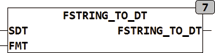
Example:
FSTRING_TO_DT('25. September 2008 at 10:01:00', '#D. #N #Y ** #h:#m:#s') FSTRING_TO_DT('13:14', '#h:#m')
| #Y | Year in the spelling in 08 or 2008 |
|---|---|
| #M | Month in the spelling of 01 or 1 |
| #N | Month in the spelling of 'Jan' or 'January' (Big and small letters are ignored) |
| #D | Day in the spelling of 01 or 1 |
| #h | Hour in the spelling of 01 or 1 |
| #m | Minute in the spelling of 01 or 1 |
| #s | Second in the spelling of 01 or 1 |